Weather Data Pipeline

Introduction
To gain a real world experience in data engineering, I built this project on Google Cloud platform. Additionally, I am using Terraform to ensure reproducability and consistency throughout the project. The main task in this project is quite straightforward that is ingesting API data from OpenWeather API, storing it, and make it available for analysis through BigQuery. The full code can be accessed through my GitHub page.
Project overview
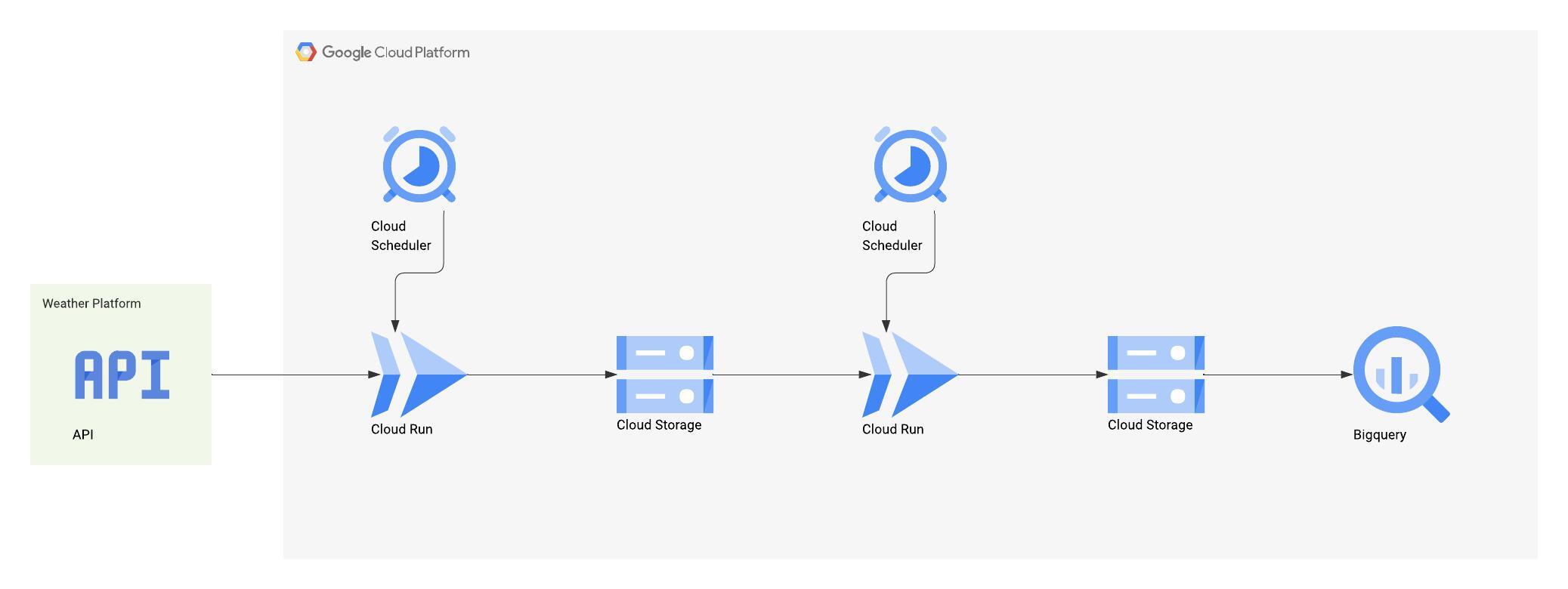
The data pipeline automates the collection and processing of weather data. First, a Cloud Run function is triggered periodically by Cloud Scheduler to fetch data from the OpenWeather API. This data is then saved as JSON files in Google Cloud Storage, with each file named according to the timestamp of its creation. A second Cloud Run function aggregates these hourly JSON files into a single daily file in a newline-delimited JSON format, adding a timestamp field to each record. This aggregated file is then made available for analysis through an external table in BigQuery. Finally, a scheduled query in BigQuery cleans and transforms the data, creating a "golden dataset" ready for visualization.
Data ingestion
The data ingestion process begins with a Cloud Run function that calls the OpenWeather API. This function is deployed using Terraform, which also handles the necessary permissions and environment variables, such as the API key and bucket name. The function receives a city name and country code, fetches the weather data, and saves it as a JSON file in a date-specific subdirectory within a Google Cloud Storage bucket.
The Cloud Run function is triggered periodically by a Cloud Scheduler job. The scheduler is configured to run every hour, sending a payload to the function that includes the city and country information.
To prepare the data for analysis in BigQuery, a second Cloud Run function, daily_summary, aggregates the hourly JSON files into a single newline-delimited JSON (.jsonl) file. This format is ideal because it retains the original data structure and is compatible with BigQuery's external tables. The function also adds a timestamp to each record by extracting the date and time from the original filename.
Function definition
As I mentioned previously, data ingestion is being done by the Cloud Run function. With a simple Python script, we can hit the API endpoint from OpenWeather API and get the result in a form of a JSON file. This file then will be saved and renamed according to when did this function triggered. The file will then be stored to Google Cloud Storage inside date subdirectory.
@functions_framework.http
def weather_to_gcs_function(request):
    """
    Cloud Function entry point for HTTP trigger.
    Fetches weather data and saves it to a GCS bucket.
    """

    request_json = request.get_json(silent=True)
    city_name = (
        request_json["city_name"] if request_json else os.environ.get("CITY_NAME")
    )
    country_code = (
        request_json["country_code"] if request_json else os.environ.get("COUNTRY_CODE")
    )
    gcs_bucket_name = os.environ.get("GCS_BUCKET_NAME")
    openweather_api_key = os.environ.get("OPENWEATHER_API_KEY")

    print(
        f"Starting weather ETL for {city_name}, {country_code} to GCS bucket: {gcs_bucket_name}..."
    )

    if not all([city_name, country_code, openweather_api_key, gcs_bucket_name]):
        error_msg = "Missing required parameters. Ensure 'city_name' and 'country_code' are in the request body or environment variables, and 'OPENWEATHER_API_KEY' and 'GCS_BUCKET_NAME' are in environment variables."
        print(error_msg)
        return error_msg, 400

    raw_data = fetch_weather_data(city_name, country_code, OPENWEATHER_API_KEY)

    if raw_data:
        timestamp = datetime.now(timezone.utc).strftime("%Y%m%d_%H%M%S")
        file_name = f"{city_name.lower().replace(' ', '_')}_{timestamp}.json"

        json_content = json.dumps(raw_data, indent=2)

        if save_to_gcs(GCS_BUCKET_NAME, json_content, file_name):
            return (
                f"Weather data for {CITY_NAME} saved to GCS successfully: {file_name}",
                200,
            )
        else:
            return "Error: Failed to save data to GCS.", 500
    else:
        print("Failed to fetch raw weather data.")
        return "Error: Failed to fetch raw weather data.", 500
The function is deployed using terraform as configured below. There are a couple of permissions that needs to be enabled to allows this function access the bucket which can be found in the project repository. This code snippet below specifies the Cloud Run function including its technical specification and environment variables.
resource "google_cloudfunctions2_function" "weather_to_gcs_function" {
  name      = var.function_name
  project   = var.gcp_project_id
  location  = var.gcp_region

  build_config {
    runtime     = "python311"
    entry_point = "weather_to_gcs_function"
    source {
      storage_source {
        bucket = google_storage_bucket.function_source_bucket.name
        object = google_storage_bucket_object.function_source_object.name
      }
    }
  }

  service_config {
    timeout_seconds       = var.timeout_seconds
    available_memory      = "${var.memory_mb}Mi"
    service_account_email = google_service_account.function_sa.email
    environment_variables = {
      OPENWEATHER_API_KEY = var.openweather_api_key
      GCP_PROJECT_ID      = var.gcp_project_id
      GCS_BUCKET_NAME     = google_storage_bucket.weather_data_bucket.name
    }
  }

  event_trigger {}

  depends_on = [
    google_project_service.cloudfunctions_api,
    google_project_service.cloudbuild_api,
    google_storage_bucket_object.function_source_object,
    google_service_account.function_sa,
    google_storage_bucket_iam_member.data_bucket_writer,
    google_project_service.iam_api,
    google_project_service.eventarc_api
  ]
}
Next, I need to summarize all of the data stored in the Cloud Storage. This step is necessary as BigQuery can only have one wild card for searching cloud storage object. I am doing this on a daily basis as there will be no new records after the day ends. The JSON file is aggregated in a new line JSON format as this format retains the original structure of the data and is compatible with BigQuery external table. Additionally, an extra field on every record is added because the API response does not include the timestamp or any time significance. This will be derived from the file name as it was named based on the timing of the function.
@functions_framework.http
def daily_summary(request):
    """
    Reformat JSON files to single NEWLINE_DELIMITED_JSON file
    """

    request_json = request.get_json(silent=True)
    bucket_name = request_json["bucket_name"] if request_json else None
    subdirectory = request_json.get(
        "subdirectory"
    )  # Get the subdirectory from the request
    output_filename = request_json.get(
        "output_filename", "output.jsonl"
    )  # Default output filename

    if not bucket_name:
        print(f"Error: Missing 'bucket_name' in request.")
        return ("Error: Missing 'bucket_name' in request.", 400)
    prefix = ""
    if subdirectory:
        prefix = subdirectory
        if not prefix.endswith("/"):
            prefix += "/"
        print(f"Processing files in subdirectory: {prefix}")
    else:
        print("Processing all files in the bucket.")

    storage_client = storage.Client(project=GCP_PROJECT_ID)
    bucket = storage_client.bucket(bucket_name)
    blobs = bucket.list_blobs(prefix=prefix)

    output_lines = []

    for blob in blobs:
        if blob.name.endswith(".json"):
            try:
                blob_content = blob.download_as_text()
                data = json.loads(blob_content)

                filename_parts = blob.name.split("_")
                if len(filename_parts) >= 3:
                    date_str = filename_parts[1]
                    time_str = filename_parts[2].split(".")[0]
                    timestamp_str = date_str + time_str
                    timestamp_obj = datetime.strptime(timestamp_str, "%Y%m%d%H%M%S")
                    data["timestamp"] = timestamp_obj.isoformat()

                one_line_json = json.dumps(data)

                output_lines.append(one_line_json)
            except Exception as e:
                print(f"Error processing file {blob.name}: {e}")
        else:
            print(f"Skipping non-JSON file: {blob.name}")

    if not output_lines:
        print("No JSON files found or processed in the bucket.")
        return ("No JSON files found or processed in the bucket.", 200)

    final_output_content = "\n".join(output_lines) + "\n"

    try:
        output_blob = bucket.blob(f"{prefix}{output_filename}")
        output_blob.upload_from_string(
            final_output_content, content_type="application/x-ndjson"
        )
        print(
            f"Successfully created and uploaded {output_filename} to bucket {bucket_name}"
        )
        return (f"Successfully processed files and created {output_filename}", 200)
    except Exception as e:
        print(f"Error uploading the output file {output_filename}: {e}")
        return (f"Error uploading the output file {output_filename}: {e}", 500)
Similar to the previous function, terraform configuration is also needed to grant the access and resource that this function needs.
resource "google_cloudfunctions2_function" "daily_summary" {
  name      = var.function_daily_name
  project   = var.gcp_project_id
  location  = var.gcp_region

  build_config {
    runtime     = "python311"
    entry_point = "daily_summary"
    source {
      storage_source {
        bucket = google_storage_bucket.function_source_bucket.name
        object = google_storage_bucket_object.function_source_object.name
      }
    }
  }

  service_config {
    timeout_seconds       = var.timeout_seconds
    available_memory      = "${var.memory_mb}Mi"
    service_account_email = google_service_account.function_sa.email
    environment_variables = {
      OPENWEATHER_API_KEY = var.openweather_api_key
      GCP_PROJECT_ID      = var.gcp_project_id
      GCS_BUCKET_NAME     = google_storage_bucket.weather_data_bucket.name
    }
    ingress_settings      = "ALLOW_ALL"
  }
Function scheduling
As the title suggests, in this part we are going to schedule the function to run periodically. This automates the process of collecting data and ensures timing consistency. Unlike configuring Cloud Run function, we just need to define three main specification which are what function to trigger, when to trigger, and what payload does this function needs.
resource "google_cloud_scheduler_job" "weather_scheduler_job" {
  for_each = { for city in local.cities : "${city.name}-${city.country}" => city }

  name             = "${var.function_name}-${lower(replace(each.value.name, " ", "-"))}-${lower(each.value.country)}"
  description      = "Triggers weather-to-gcs-function for ${each.value.name}, ${each.value.country}"
  schedule         = "0 * * * *"
  time_zone        = "Australia/Brisbane"
  attempt_deadline = "180s"
  project          = var.gcp_project_id
  region           = var.gcp_region

  http_target {
    uri         = google_cloudfunctions2_function.weather_to_gcs_function.url
    http_method = "POST"
    body        = base64encode(jsonencode({
      city_name    = each.value.name,
      country_code = each.value.country
    }))
    headers = {
      "Content-Type" = "application/json"
    }
    oidc_token {
      service_account_email = google_service_account.scheduler_sa.email
      audience              = google_cloudfunctions2_function.weather_to_gcs_function.url
    }
  }

  depends_on = [
    google_project_service.cloudscheduler_api,
    google_cloudfunctions2_function.weather_to_gcs_function,
    google_cloud_run_v2_service_iam_member.weather_invoker_permissions,
    google_service_account.scheduler_sa
  ]
}
Data loading
After the data is stored at Google Cloud Storage, we can load the data right away with BigQuery. This external feature table is very useful to analyze data inside Google Cloud Storage without any extra steps. I simply made a Terraform to create this resource. As highlighted in the code snippet below, I simply specify the wildcard pattern on where the target data is and BigQuery will automatically detects the schema.
resource "google_bigquery_table" "raw_weather_json_external" {
  dataset_id = google_bigquery_dataset.weather_dataset.dataset_id
  table_id   = "raw_weather_json"
  project    = var.gcp_project_id
  description = "External table pointing to raw weather JSON data in GCS"
  deletion_protection = false


  external_data_configuration {
    source_format = "NEWLINE_DELIMITED_JSON"
    autodetect    = true
    source_uris = ["gs://${google_storage_bucket.weather_data_bucket.name}/*/output.jsonl"]
  }

  depends_on = [
    google_bigquery_dataset.weather_dataset,
    google_storage_bucket.weather_data_bucket
  ]
}
Data transformation
After the data is stored in Cloud Storage, it is loaded into BigQuery using an external table. This approach is efficient as it allows for querying the data directly from Cloud Storage without needing to load it into a managed BigQuery table first. The external table is defined using Terraform and uses a wildcard pattern to automatically detect and process the daily .jsonl files in the storage bucket.
To create a clean and usable dataset for analysis, a scheduled query runs daily in BigQuery. This query performs data cleaning and transformation, calculating the average of various numerical values like temperature, humidity, and wind speed, and grouping them by timestamp and city. The query uses the WRITE_TRUNCATE disposition, which overwrites the target table daily, ensuring that the weather_data_clean table remains up-to-date and serves as the primary dataset for analytics.
resource "google_bigquery_data_transfer_config" "weather_query_config" {
  depends_on = [
    google_project_iam_member.scheduled_query_permissions,
    google_bigquery_dataset_iam_member.weather_data_staging_editor,
    google_bigquery_dataset_iam_member.weather_data_viewer,
    google_storage_bucket_iam_member.gcs_bucket_reader
  ]

  display_name           = "weather-data-materialization"
  location               = var.gcp_region
  data_source_id         = "scheduled_query"
  schedule               = "every 24 hours"
  destination_dataset_id = google_bigquery_dataset.weather_data_staging_dataset.dataset_id
  service_account_name   = google_service_account.query_scheduler_sa.email

  params = {
    destination_table_name_template = "weather_data_clean"
    write_disposition               = "WRITE_TRUNCATE"
    query = <<EOT
    SELECT
      CAST(timestamp AS TIMESTAMP) AS timestamp,
      name AS city,
      AVG(CAST(main.temp AS FLOAT64)) AS temperature,
      AVG(CAST(main.humidity AS FLOAT64)) AS humidity,
      AVG(CAST(main.feels_like AS FLOAT64)) AS feels_like,
      AVG(CAST(main.temp_min AS FLOAT64)) AS temp_min,
      AVG(CAST(main.temp_max AS FLOAT64)) AS temp_max,
      AVG(CAST(main.pressure AS FLOAT64)) AS pressure,
      AVG(CAST(wind.speed AS FLOAT64)) AS wind_speed,
      AVG(CAST(wind.gust AS FLOAT64)) AS wind_gust,
      AVG(CAST(wind.deg AS FLOAT64)) AS wind_deg
          FROM
        `${google_bigquery_dataset.weather_dataset.dataset_id}.${google_bigquery_table.raw_weather_json_external.table_id}`
      GROUP BY
        timestamp, city
    EOT
  }
}
Data visualization
The final step is to visualize the processed data. The article uses Apache Superset, an open-source business intelligence tool similar to Tableau and Power BI. Since Apache Superset supports connecting to various databases, including BigQuery, it can pull the updated data directly from the cleaned weather_data_clean table. The project includes a dashboard with global city filters, allowing for dynamic and automated data analysis as the BigQuery table is updated daily.